知识点
查看页面性能
console.table(performance.timing);查看变量的数据类型
typeof:适用于基本数据类型(注意:typeof null -> object,typeof [funtion] -> function,其它引用类型都是object)instanceof:适用于引用类型
mongodb 和 mysql 的区别
MongoDB 和 MySQL 的区别:https://aws.amazon.com/cn/compare/the-difference-between-mongodb-vs-mysql/
TS as const 类型用法
export const keys = ['a', 'b', 'c'] as const;

// Key 类型为 'a' | 'b' | 'c'
export type Key = (typeof keys)[number];
JS 手动触发 window 事件
该方式使用了 DOM 实例的 dispatchEvent 方法(和 addEventListener 方法类似的通用的 API),参考链接:
- MDN Event:https://developer.mozilla.org/zh-CN/docs/Web/API/Event/Event
- MDN dispatchEvent:https://developer.mozilla.org/zh-CN/docs/Web/API/EventTarget/dispatchEvent
示例:
const event = new Event('resize');
window.dispatchEvent(event);
.gitkeep 文件作用
其作用是为了使 Git 保留空目录。.gitkeep 文件本质上就是一个普通文件,文件名是社区的一个约定,起到一个统一的目的,让开发者一眼就知道这个文件的作用
HTML rel 属性
rel 属性定义了所链接的资源与当前文档的关系,仅在 a、area 和 link 标签有效
a 标签常用:
rel="noopener noreferer"
参考:
- https://developer.mozilla.org/zh-CN/docs/Web/HTML/Element/a
- https://developer.mozilla.org/zh-CN/docs/Web/HTML/Attributes/rel
data-* 属性使用
元素的 data-* 属性值可以通过只读属性 dataset 获取,例如掘金 body 元素上的 data-theme="light",可通过 document.body.dataset 获取
示例:
<!DOCTYPE html>
<html>
    <head></head>
    <body data-theme="light"></body>
</html>console.log(document.body.dataset);
// DOMStringMap {theme: 'light'}范围:所有元素
参考:https://developer.mozilla.org/zh-CN/docs/Web/API/HTMLElement/dataset
iframe 通信
前置条件:a.html 里面嵌套一个 iframe#iframeB,iframe 里面打开 b.html
同源情况:
a.html 向 b.html 通信
// a.html
const iframeB = document.getElementById('iframeB');
iframeB.onload = () => {
    const message = 'A message from a.html.';
    // 通过 iframeB.contentWindow 获取 b.html 的全局上下文
    iframeB.contentWindow.xxx(message);
};
b.html 向 a.html 通信
// b.html
const message = 'A message from b.html.';
// iframe 可通过 window.parent 获取父级上下文
window.parent.xxx(message);
// iframe 可通过 window.top 获取顶级上下文
window.top.xxx(message);
跨域情况:
跨域情况比较灵活,不用区分父子页面,此处仍以以 a.html 向 b.html 发消息举例
// 发送消息
const iframeB = document.getElementById('iframeB');
iframeB.onload = () => {
    const message = 'A message from a.html.';
    // 通过 iframeB.contentWindow 获取 b.html 的全局上下文
    // 第二个参数具体使用时,请结合 b.html 域实际情况,例如 https://www.baidu.com
    iframeB.contentWindow.postMessage(message, 'https://www.example.com');
};

// b.html 接收消息
window.addEventListener('message', (e) => {
    // 通过 origin 属性对消息进行过滤,避免遭受 XSS 攻击
    if (e.origin === 'https://www.example.com') {
        // 发送消息所在域
        console.log(e.origin);
        // 发送的消息
        console.log(e.data);
    }
});
补充 window.postMessage 信息
语法:
otherWindow.postMessage(message, targetOrigin, [transfer]);otherWindow:
其他窗口的一个引用,比如 iframe 的 contentWindow 属性、执行 window.open 返回的窗口对象、或者是命名过或数值索引的 window.frames
重点:通过 window.open 打开的网页与原网页之间能够通过此方式进行通信
参考:
- https://mdnice.com/writing/c5345a08a81740f797f5239a73f34d4b
- https://developer.mozilla.org/zh-CN/docs/Web/API/Window/postMessage
CDN 回源是什么?
CDN 回源就是当有用户访问某一个 URL 的时候,若是被解析到的那个 CDN 节点没有缓存响应的内容,或者是缓存已经到期,就会回源站去获取
参考:https://www.huaweicloud.com/zhishi/edit-cdn157.html
HTML meta 元素
HTML <meta> 元素表示那些不能由其他 HTML 元相关(meta-related)元素表示的元数据信息。如:<base>、<link>、<script>、<style> 或 <title>
此处仅作概述,建议去 MDN 文档查看更多详细信息
参考:https://developer.mozilla.org/zh-CN/docs/Web/HTML/Element/meta
?. 和 ??
MDN 链接:
可选链运算符(?.):在读取对象属性时,当引用为 null 或 undefined 时不会引起错误,返回 undefined;与函数调用一起使用时,若给定的函数不存在不会引起错误,返回 undefined
const foo = {};

// 报错
console.log(foo.a.b);
// 返回 undefined
console.log(foo.a?.b);

// 报错
console.log(foo?.a());
// 返回 undefined
console.log(foo?.a?.());
空值合并运算符(??):当左侧的操作数为 null 或者 undefined 时,返回其右侧操作数,否则返回左侧操作数
注意与
||运算符区别,||当左边的操作数“值”为false时返回右侧操作数
自定义事件 & 手动派发事件
MDN:https://developer.mozilla.org/zh-CN/docs/Web/Events/Creating_and_triggering_events
手动派发事件核心:EventTarget.dispatchEvent()
问题来源:某些项目通过自定义事件派发数据
const eventName = 'WorkspaceChange';
const event = new Event(eventName);

// 监听事件
window.addEventListener(eventName, (e) => {
    console.log('触发了自定义事件:', eventName);
});

// 派发事件
window.dispatchEvent(event);
注意 EventTarget.dispatchEvent() 除了能派发自定义事件,还能派发内置事件
例如:模拟鼠标点击事件
const event = new MouseEvent('click', {
    view: window,
    bubbles: true,
    cancelable: true
});

window.dispatchEvent(event);
自定义事件携带参数的情况:
const eventName = 'WorkspaceChange';
const event = new CustomEvent(eventName, { detail: 'David' });
window.addEventListener(eventName, (e) => {
    console.log('触发了自定义事件:', eventName);
    console.log('携带参数:', e.detail);
});

window.dispatchEvent(event);
模板字符串(标签函数)
模板字符串支持使用函数解析字面量,该函数称作标签函数
使用示例:
function tag(strings, values) {
    console.log(strings, values); // ['name: ', ', age: ', '', raw: Array(3)] 'David'
    return 'tag result';
}

const name = 'David';
const age = 24;
const message = tag`name: ${name}, age: ${age}`;
console.log(message); // tag result
案例:设置元素样式
现有方式:
const el = document.querySelector('#app');

const width = '200px';
const height = '200px';
const bgColor = 'skyblue';
const fontSize = '20px';
const color = 'red';

el.style['width'] = width;
el.style['height'] = height;
el.style['background-color'] = bgColor;
el.style['font-size'] = fontSize;
el.style['color'] = color;

el.style['font-weight'] = 'bold';
使用标签函数,将命令式写法改为声明式:
const el = document.querySelector('#app');
el.setStyle = function (strings, ...values) {
    let cssText = strings[0];
    for (let i = 0; i < values.length; i++) {
        cssText += values[i];
        cssText += strings[i + 1];
    }

    this.style.cssText += cssText;
};

const width = '200px';
const height = '200px';
const bgColor = 'skyblue';
const fontSize = '20px';
const color = 'red';

el.setStyle`
    width: ${width};
    height: ${height};
    background-color: ${bgColor};
    font-size: ${fontSize};
    color: ${color};
`;

el.setStyle`
    font-weight: bold;
`;
监听 DOM 更改(MutationObserver)
参考链接:https://developer.mozilla.org/zh-CN/docs/Web/API/MutationObserver/MutationObserver
// 监听变化时执行的回调函数
const callback = (mutationList, observer) => {
    for (const mutation of mutationList) {
        console.log(mutation);

        if (mutation.type === 'childList') {
            console.log('A child node has been added or removed.');
        } else if (mutation.type === 'attributes') {
            console.log(`The ${mutation.attributeName} attribute was modified.`);
        }
    }
};

const observer = new MutationObserver(callback);

const targetNode = document.getElementById('app');
const config = {
    // 观测属性变动
    attributes: true,
    // 观测子节点变动,是否有增加或者删除
    childList: true,
    // 观察后代节点
    subtree: true
};
observer.observe(targetNode, config);
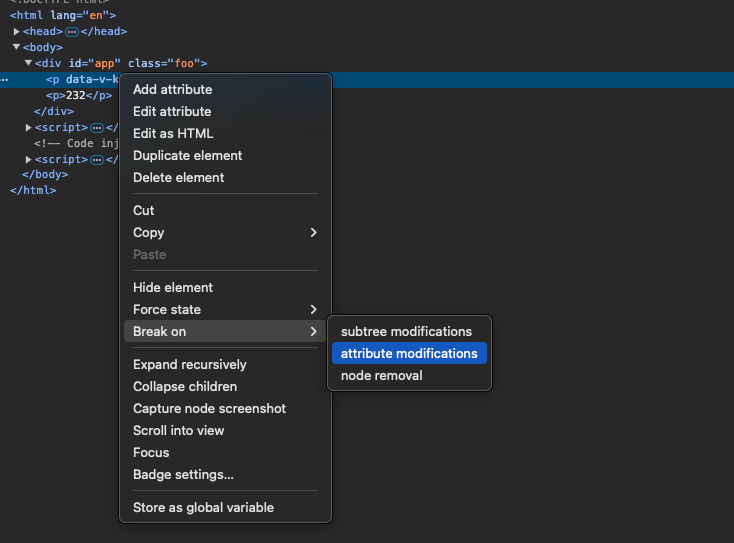
逆向找到修改元素属性的代码
骨架屏原理
展示效果:https://lvdengming.github.io/demo/#/skeleton
原理:background-image + linear-gradient + background-position 组合使用,通过不断移动背景图片位置形成动画效果
background-position 百分比对应的计算方式为:(容器尺寸 - 背景图片尺寸) * 百分比
WARNING
当背景图片尺寸大于容器尺寸时,设置百分比实际上是反方向移动
多列布局
- column-count:指定列的数量
- column-fill:元素分成列时的平衡方式
- column-gap:列的间距
- column-rule:列分割线的宽度、样式、颜色(是一个简写属性)
- column-span:在子元素中使用,可以让元素跨越所有的列
- column-width:列宽
详细信息请参考 MDN:https://developer.mozilla.org/zh-CN/docs/Web/CSS/column-count
document.referrer
document.referrer 返回的是一个 URI,当前页面就是从这个 URI 所代表的页面跳转或打开的
如果页面是通过地址栏打开的,那么 document.referrer 为空字符串
在 iframe 中,document.referrer 会初始化为父窗口 Window.location 的 href
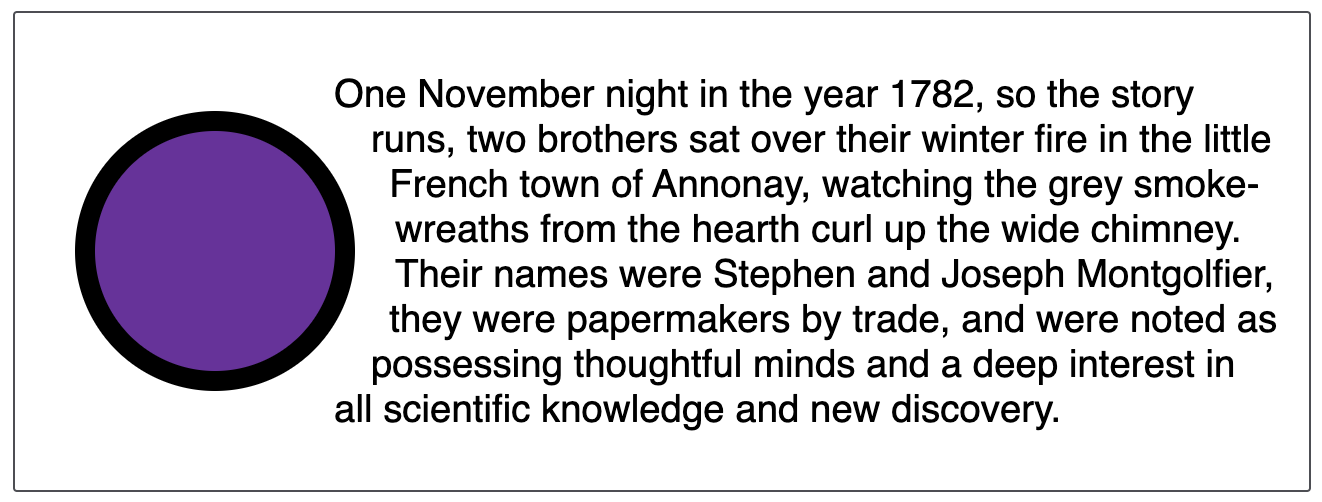
文字环绕效果(内联元素环绕)
需使用 css 的 shape-outside 等特性进行设置,兼容性还可以。效果如下:
MDN:https://developer.mozilla.org/zh-CN/docs/Web/CSS/shape-outside
在 Chrome 上调试 node
步骤如下:
- 执行 node 时添加
--inspect选项,例如node --inspect index.js

在 Chrome 中打开
http://localhost:9229按下
F12打开开发者工具,点击 Node 图标
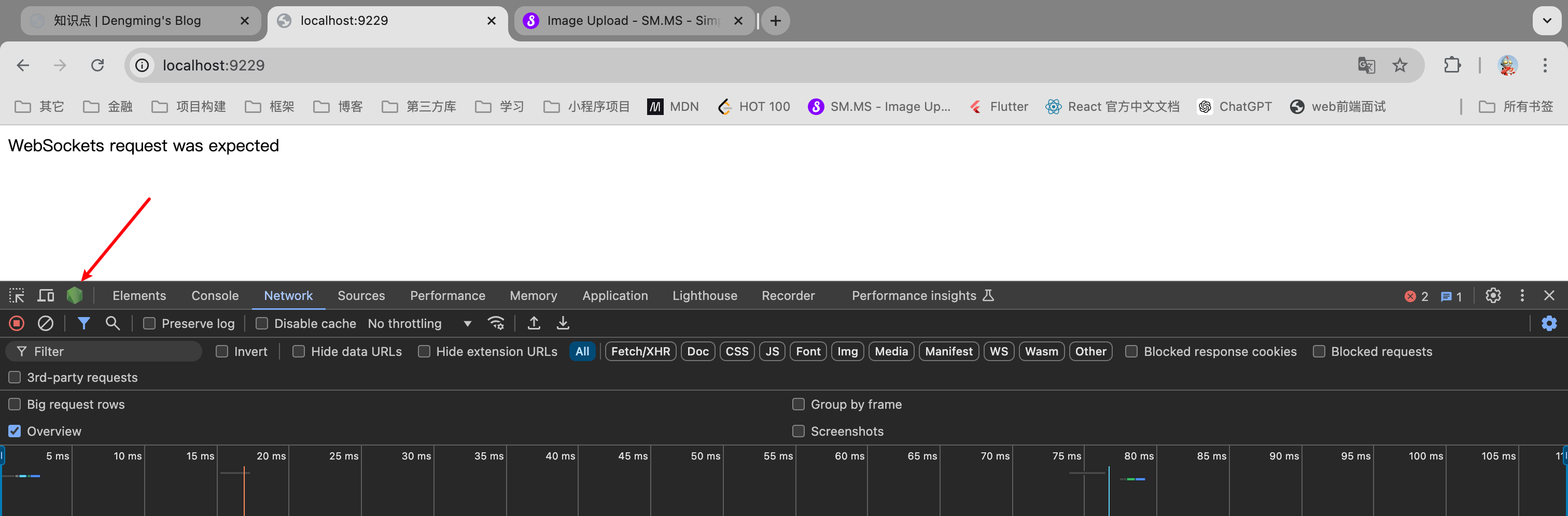
- 在弹出的调试窗口即可进行调试

更多请参考:
- https://nodejs.org/zh-cn/learn/getting-started/debugging
- https://nodejs.cn/en/learn/getting-started/debugging
github 查看最近一周 star 排名
可以在 github 搜索框中输入这样的内容 stars:>1 pushed:2024-08-28..2024-09-03,再按照需求排序(参考)
也可以参考网站(推荐):
- Github Ranking: https://github.com/EvanLi/Github-Ranking
- Gitstar Ranking: https://gitstar-ranking.com/
css 鼠标相关
/* 屏蔽鼠标事件 */
pointer-events: none;

/* 禁止用户选择文本 */
user-select: none;
什么是 Node BFF?
BFF 是一种 Web 架构,全名为 Backends For Frontends,即为服务于前端的后端。简单来说 Node BFF 就是用 Node 做的中间层服务。更多请参考以下文章:
https://juejin.cn/post/7240404579133128760
浏览器如何获取文件、文件夹信息
主要通过 input 文件控件和 File System Access API。详细信息如下:
- 通过
<input type="file" />允许用户从本地选择文件,获取其文件名、大小、类型等
<input type="file" id="fileInput" multiple />
<script>
    document.getElementById('fileInput').addEventListener('change', function (event) {
        const files = event.target.files; // 获取用户选择的文件列表
        for (let i = 0; i < files.length; i++) {
            console.log('文件名: ' + files[i].name);
            console.log('文件大小: ' + files[i].size);
            console.log('文件类型: ' + files[i].type);
        }
    });
</script>
File System Access API:一种较新的 API,它允许 Web 应用程序访问用户的本地文件和文件夹,但这需要用户的明确授权
// 获取文件
async function getFile() {
    try {
        const [fileHandle] = await window.showOpenFilePicker();
        const file = await fileHandle.getFile();
        console.log('文件名: ' + file.name);
        console.log('文件大小: ' + file.size);
        console.log('文件类型: ' + file.type);
    } catch (error) {
        console.error('文件选择被取消或出现错误:', error);
    }
}

// 获取文件夹
async function getFolder() {
    try {
        const folderHandle = await window.showDirectoryPicker();
        for await (const [name, handle] of folderHandle) {
            if (handle.kind === 'file') {
                console.log('文件名: ' + name);
            } else if (handle.kind === 'directory') {
                console.log('文件夹名: ' + name);
            }
        }
    } catch (error) {
        console.error('文件夹选择被取消或出现错误:', error);
    }
}
总结:
- 无论是使用
<input>还是File System Access API,浏览器都无法在没有用户交互的情况下直接访问本地文件系统,这是为保护用户隐私和安全性所设计的 File System Access API存在兼容性问题,并不是广泛支持的
重写 JS 默认特性
通过 Symbol.xxx 符号对对象默认特性进行重写,现在支持的特性如下:
Symbol.asyncIterator符号指定了一个对象的默认异步迭代器。如果一个对象设置了这个属性,它就是异步可迭代对象,可用于 for await...of 循环Symbol.hasInstance符号用于判断某对象是否为某构造器的实例。因此你可以用它自定义instanceof操作符在某个类上的行为Symbol.isConcatSpreadable符号用于配置某对象作为Array.prototype.concat()方法的参数时是否展开其数组元素Symbol.iterator符号为每一个对象定义了默认的迭代器。该迭代器可以被for...of循环使用Symbol.match符号指定了匹配的是正则表达式而不是字符串。String.prototype.match()方法会调用此函数Symbol.matchAll内置通用(well-known)符号指定方法返回一个迭代器,该迭代器根据字符串生成正则表达式的匹配项。此函数可以被String.prototype.matchAll()方法调用Symbol.replace符号指定了当一个字符串替换所匹配字符串时所调用的方法。String.prototype.replace()方法会调用此方法Symbol.search符号指定了一个搜索方法,这个方法接受用户输入的正则表达式,返回该正则表达式在字符串中匹配到的下标,这个方法由以下的方法来调用String.prototype.search()Symbol.species符号是个函数值属性,其被构造函数用以创建派生对象Symbol.split符号指向一个正则表达式的索引处分割字符串的方法。这个方法通过String.prototype.split()调用Symbol.toPrimitive符号指定了一种接受首选类型并返回对象原始值的表示的方法。它被所有的强类型转换制算法优先调用Symbol.toStringTag符号用于创建对象的默认字符串描述。它由 Object.prototype.toString() 方法内部访问Symbol.unscopables符号指用于指定对象值,其对象自身和继承的从关联对象的 with 环境绑定中排除的属性名称
惰性函数(Lazy Function)
在第一次调用时进行初始化,然后将自身替换为另一个函数,以后所有调用都直接使用新函数,避免重复的初始化操作
这是一种优化性能的编程技巧
示例代码:
let lazyFunction = () => {
    console.log('初始化操作');

    lazyFunction = () => {
        console.log('执行实际操作');
    };

    return lazyFunction();
};

// 第一次调用会执行初始化操作
lazyFunction();

// 后续调用,直接执行实际操作
lazyFunction();
lazyFunction();
实战代码(拷贝内容到剪切板):
function copyText(text) {
    if (navigator.clipboard) {
        copyText = (text) => {
            navigator.clipboard.writeText(text);
        };
    } else {
        copyText = (text) => {
            const input = document.createElement('input');
            input.setAttribute('value', text);
            document.body.appendChild(input);
            input.select();
            document.execCommand('copy');
            document.body.removeChild(input);
        };
    }

    copyText(text);
}
系统级别的取色器(EyeDropper)
MDN: https://developer.mozilla.org/zh-CN/docs/Web/API/EyeDropper
toB 和 toC 分别代表什么含义?
ToB(To Business)和 ToC(To Consumer)是两种不同的商业模式,分别针对不同的客户群体
- ToB:面向企业,交易额大,定制化强,销售周期长
- ToC:面向个人消费者,交易额小,标准化强,销售周期短
css 属性的特殊值
initial: css 属性的默认值(不是浏览器的默认值)
记忆各种属性的默认值有心智负担(例如
line-height的默认值是normal),所以使用 initial 来统一指代
unset: 表现为没有设置 css 属性值(不能继承就使用默认值 initial,能继承就继承属性值 inherit)
如果直接不设置属性值,那么元素样式会被浏览器默认样式影响,所以使用
unset属性值告诉浏览器这个样式没有被设置,即不使用浏览器默认样式
revert: 将属性样式值回归到浏览器的默认样式(不是属性的默认值)
TIP
如果要简写所有属性,可以使用 all 属性。例如将 p 元素的所有样式属性设置为 unset:
p {
    all: unset;
}元素进入全屏模式(requestFullscreen() 方法)
要点:
- 使用
el.requestFullscreen()方法发出异步请求使元素进入全屏模式 - 使用
document.fullscreenElement属性来判断是否有元素已经进入全屏模式 - 使用
document.exitFullscreen()方法禁用全屏模式 - 进入全屏模式必须通过用户行为,例如点击,直接使用代码不会生效
requestFullscreen()返回Promise<void>,如果进入全屏模式失败,可通过 Promise 实例的 catch 方法进行捕获
参考:https://developer.mozilla.org/zh-CN/docs/Web/API/Element/requestFullscreen
Base64 编码
Base64 是为了避免数据传输过程中乱码的情况,是基于64个可打印字符来表示二进制数据的一种方法
64 个字符分别是:A-Z, a-z, 0-9, +, /
其中等号是空白占位符
参考:
- 一篇文章彻底弄懂 Base64 编码原理
- window.atob(): 将 Base64 编码的字符串进行解码
- window.btoa(): 将二进制字符串编码为 Base64 编码的 ASCII 字符串
atob 理解:ASCII to Binary,即将 ASCII 字符串还原成二进制字符串(解码),btoa 则相反
正则命名捕获组
使用 (?<name>) 这样的形式对组进行命名,在 match 方法返回结果通过 res.groups.name 拿到匹配结果。例如:
// 通过命名捕获组获取年月日
const groups = '2024-02-24'.match(/(?<year>[0-9]{4})-(?<month>[0-9]{2})-(?<day>[0-9]{2})/).groups;
console.log(groups); // {year: '2024', month: '02', day: '24'}更多:https://www.cnblogs.com/ziyunfei/p/6761413.html
正则安全性(ReDoS)
主要存在的问题是嵌套量词,例如 (a+)+。工具网站:
记录代码运行时间(console.time, console.timeEnd)
console.time('run');

for (let i = 0; i < 1000_000; i++) {}

console.timeEnd('run');

// run: 1.464111328125 ms
注意
console.time(),console.timeEnd()方法传递的 label 必须一致才能停止计时器
相关链接:
console.time(): https://developer.mozilla.org/zh-CN/docs/Web/API/console/time_staticconsole.timeEnd(): https://developer.mozilla.org/zh-CN/docs/Web/API/console/timeEnd_static
关闭标签页(页面信息未保存提示)
通过 window.beforeunload 事件进行处理。
目前绝大部分浏览器不支持设置提示信息内容(returnValue),为兼容性处理还是需要为其设置值
window.addEventListener('beforeunload', (event) => {
    event.preventDefault();
    event.returnValue = '';
});更多:https://developer.mozilla.org/zh-CN/docs/Web/API/Window/beforeunload_event
拦截用户点击链接跳转
核心代码:
document.addEventListener('click', function (e) {
    const target = e.target.closest('a');
    if (target && confirm('确认跳转?')) {
        e.preventDefault();
        // 手动处理跳转逻辑(如记录或异步操作)
    }
});参考示例:https://lvdengming.github.io/demo/#/link-interceptor
此处仅展示了用户点击链接跳转,页面链接跳转还有 location, window.open(), history api 等等,这些都需要额外进行处理
参考:
express 实现接口转发
通常通过 http-proxy-middleware 三方库进行实现
参考案例:api-proxy
参考文档:
监听浏览器切换标签页、最小化窗口
通过 document 的 visibilitychange 进行监听,通过 document.hidden、document.visibilityState 查看页面状态
参考:
- https://developer.mozilla.org/zh-CN/docs/Web/API/Document/visibilitychange_event
- https://developer.mozilla.org/zh-CN/docs/Web/API/Document/visibilityState
git 查看两次提交的文件变更
# 查看两次提交的文件变更
git diff --name-only HEAD~1 HEAD

# 查看两次提交的新增文件
git diff --name-only --diff-filter=A HEAD~1 HEAD

# diff-filter 选项:Added (A), Copied (C), Deleted (D), Modified (M), Renamed (R)
npm 查看三方库的信息
# 查看三方库信息(方便人阅读)
npm view eslint

# 查看三方库信息(方便代码阅读)
npm view eslint --json

# 查看三方库的可用版本
npm view eslint versions

# 查看三方库的 dependencies
npm view eslint dependencies

# 查看三方库的 devDependencies
npm view eslint devDependencies

# 查看三方库的其它信息
npm view eslint scripts
通过 npm view eslint xxx可以查看三方库中 package.json 所有信息
通过这种方式 + 自定义 JS 脚本,可以统一设置代码仓的依赖信息
注意:
npm view xxx查看的是远程 npm 注册表 查看本地信息使用npm view . xxx或者npm list命令 更多可参考:https://chat.deepseek.com/share/5qqriehzrqvmvjnoi1